Posture Reminder AI FAQ for Mac

Frequently Asked Questions

More questions? Email us

2

Why am I not getting posture reminders while Focus is on?

macOS Focus can silence Posture Reminder AI notifications unless the app is allowed in that Focus profile.

  1. Open Settings on your Mac.
  2. Go to Focus.
  3. Select the Focus mode you use for work.
  4. In Allowed Apps, add Posture Reminder AI.

Once allowed, posture reminders can appear even while Focus is on.

Allow Posture Reminder AI notifications in macOS Focus Mode

3

Is Posture Reminder AI safe if I care about camera privacy?

Yes. Posture Reminder AI is designed so your posture data stays on your Mac.

  • No cloud processing: posture analysis runs locally on your device.
  • No recording: the app does not store or upload photos or video.
  • No data resale: your posture data is used only to personalize reminders for you.

The camera is used only for live posture detection, similar to a coach watching your posture in real time without keeping a recording.

5

Posture Reminder AI won't start or can't see me. How do I fix it?

This is usually a camera permission issue.

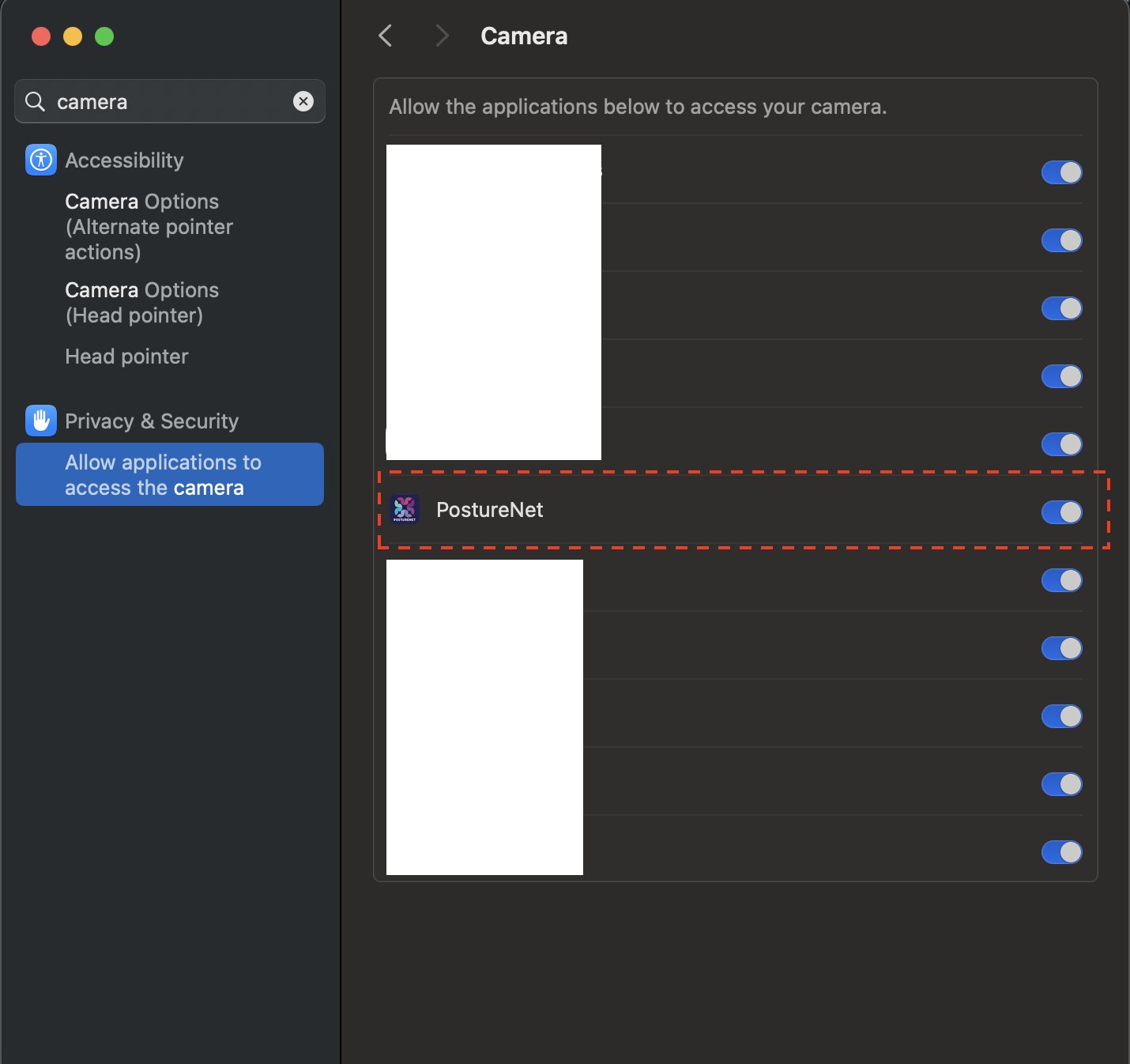
  1. Open the Settings app on your Mac.
  2. Go to Privacy & Security > Camera.
  3. Make sure Posture Reminder AI is allowed to access your camera.
  4. Quit and reopen the app.

If the selected camera is disconnected or already in use by another app, reconnect it or choose a different camera in Posture Reminder AI settings.

Allow camera access for Posture Reminder AI in macOS settings
6

Can I use Posture Reminder AI with my iPhone camera?

There is no iPhone app right now, but you can use your iPhone as the camera for Posture Reminder AI through Apple's Continuity Camera on Mac.

You need a Mac running the latest macOS Tahoe release and an iPhone that supports Continuity Camera and is updated to a current version of iOS.

For the best results, mount the iPhone at eye level on a stable stand. See our recommended iPhone stands.

7

How much does Posture Reminder AI cost?

The direct download is a $49 one-time purchase for one person. It includes the current direct-download Mac release, all updates released during the current major-version year, and dashboard access to refreshed download links.

Secure Stripe checkout. 14-day money back guaranteed. For team, company, or group purchases, contact sales.

If you prefer Apple billing and App Store delivery, the Mac App Store monthly and annual plans are still available there.

8

How should I choose my reminder frequency?

You can choose how often Posture Reminder AI reminds you after it detects posture drift.

Open Posture Reminder AI > Settings, choose your reminder interval, then restart the app to apply the change.

If you are just getting started, use a shorter interval. Once better posture feels more automatic, move to a longer interval.

10

Why do I need to stay in view of the camera for posture tracking?

The camera is how Posture Reminder AI tells the difference between your upright posture and the slump you want it to catch.

  • Private on-device processing: posture analysis runs locally on your Mac.
  • No recording: the app does not store or upload photos or video of you.
  • Real-time reminders: once setup is complete, the app can alert you as soon as your posture drifts.

Without a camera view, the app has no signal to measure your posture.

11

How does Posture Reminder AI work?

Posture Reminder AI uses on-device computer vision and a personalized model built from the setup examples you record.

During setup, you capture your natural upright posture and the slump you want the app to catch.

After that, the app monitors posture in real time on your Mac and sends a reminder when it detects that same drift.

For a technical overview, read how Posture Reminder AI works.

12

When should I reset my posture setup?

Reset your posture setup after any change that affects how you look on camera.

  • You switched from the built-in camera to an external webcam or iPhone camera.
  • You moved desks, changed monitor height, or switched between sitting and standing.
  • The app suddenly starts missing reminders or treating upright posture as slouching.

Setup takes about a minute and usually restores accurate reminders.

13

What are the system requirements for Posture Reminder AI on Mac?

To use Posture Reminder AI on Mac, you need:

  • A Mac running the latest macOS Tahoe release or newer.
  • A built-in camera, external webcam, or supported iPhone camera through Continuity Camera.

For the most consistent posture tracking, keep your camera angle and desk setup steady after setup.

14

Is Posture Reminder AI available only on Mac?

Yes. Posture Reminder AI is currently available only on Mac.

There is no Windows, iPhone, or Android version today.

The app is built specifically for macOS and uses Apple's on-device machine learning frameworks to analyze posture privately on your Mac. If you want support for another platform, contact us.